Click the Ignition button (or press I) in Neutral to start the engine — same button turns it back off, also from Neutral. The engine has to be running before you can shift.
Drag the wheel or use ←→ to steer.
Click the pedals, use ↑↓, or W/Q (gas) and S/X (brake) to ramp up/down.
Click F/N/R on the shifter or press F/N/R to change direction — you must be stopped first.
Nothing scores until you click Start Practicing — you can still start the engine and shift around in place first, so take your time getting settled before you click it. Back the trailer into the marked space (it has to come into the space in reverse; driving in forward doesn't count), line it up with the space, and come to a stop, and it scores itself automatically — up to 100 points per park (40 for getting the whole trailer inside the lines, 20 for alignment, 20 for how well-centered you are, and 20 for how few direction changes it took — going F to R counts as a change even if you pass through N). The space turns green when the whole trailer is in it, straight, and stopped. The trailer can hit things too, so watch its corners as well as the truck's. Nothing to click — just keep sitting there, clock still running. Pull back out and park again whenever you're ready to bank more points; there's no reset between attempts. You need at least one completed park to score anything, and 100 cumulative points to pass before the clock runs out.
The same button then relabels itself Pause Practicing — click it any time to freeze everything (the clock, the vehicle), and it becomes Continue Practicing to pick back up right where you left off.
On lots with a pedestrian, click anywhere on the lot to send them walking there — steer clear of them, a strike costs 40 points, the heaviest fault there is. 3D Cab View is on by default — H (or the sidebar button) switches to the 2D overhead view and back. The camera follows your shifter: in F you're in the driver's seat; shift to R and the side mirrors grow into big live views while a backup camera on the trailer's rear appears on the dash, with colored lines showing where the trailer will go if you hold the wheel where it is. V picks a different camera (cab, reverse assist, full-screen backup cam, drone) until your next shift. Hold A/D to glance left/right, or drag the view (double-click to look ahead). Watch the hitch-angle warning (in both views) — past 60° you're close to jackknifing, and at 70° the trailer jams against the truck: the rig stops, it costs 15 points, and only pulling forward straightens it out.
In the 2D view, a gauge in the corner shows the hitch angle, and in R colored lines show where the trailer's rear corners will go. Not sure how to start? Watch Auto-Park (before you click Start Practicing, or any time in Practice Mode) shows a park from the start line, with captions; Esc stops it. After a park, Replay Last Park in the sidebar plays it back at double speed. Your best session and best park are saved for each lot, trailer weight and trailer length. Unhitch (U, while stopped) leaves the trailer where it is so you can drive the truck free. To hitch up again, back the hitch ball under the coupler (the 2D view shows how far; the 3D backup camera becomes a hitch camera), stop, and press Hitch. Bumping the trailer costs 10 points, and nothing scores while you are unhitched. The Hitch Up & Park lot starts you unhitched: hitch up first (up to 20 points for doing it in 2 or fewer direction changes), then back the trailer into the bay.
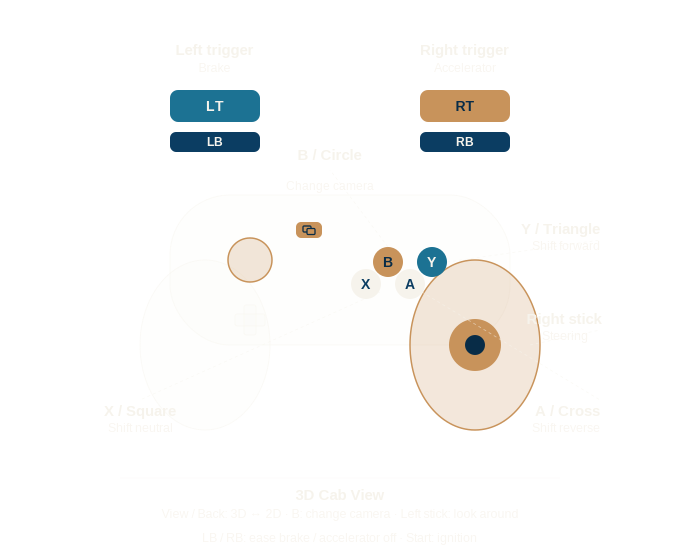
Hover any control for a reminder of its hotkey. A connected game controller works too — turn it on from the Setup menu. On a controller, View/Back switches 3D/2D, B changes camera, and the left stick looks around.